1/31 Cosmo AMPS 185

Nice and flat last night. I hope you see some green today - and not lime green! LOL!:p No sharks Cosmo... Stay on the beach and close to the shore if you go surfing! It looks like it's going to be a great day for the beach!

Karen, this beach and surfing thing refers to the 'blue' beach and the 'green' lagoon - where we all hope our kitties will surf all day:D
 
+1 drop to 125. Will scan every 20 minutes and monitor the drop (hopefully into safe green territory). Have gravy food on hand if he gets close to lime.
 
+1 drop to 125. Will scan every 20 minutes and monitor the drop (hopefully into safe green territory). Have gravy food on hand if he gets close to lime.

How about a teaspoon of LC at +1 / +2. Want to keep this one surfing for as long as possible...no drama today please! :facepalm:
 
1.75 not a good plan. Rocket ship drop toward 50. +3.5 was at 53. Gave MC food when he was in 70’s and honey at 50. He’s at 61 now.

You can add those extra numbers into your cells by stacking them; use the alt/enter key to add extra numbers in the same cell so that we can see the action.

He must still have a full depot and/or is responding very well to the removal of the Epigen dry food and/or is just very responsive to the insulin. I have to wonder if he'd have gone down this morning on the 1.5 dose - he was doing pretty good, although a little high, in the blues all night. Maybe he's one of these kitties who's going to need a little more time to show you what he's got under the hood.

I hope he doesn't bounce again - I'd go back to 1.5 tonight and let him show you how long it takes to get back to some better numbers. What a performance for a Monday morning!
 
You can add those extra numbers into your cells by stacking them; use the alt/enter key to add extra numbers in the same cell so that we can see the action.

He must still have a full depot and/or is responding very well to the removal of the Epigen dry food and/or is just very responsive to the insulin. I have to wonder if he'd have gone down this morning on the 1.5 dose - he was doing pretty good, although a little high, in the blues all night. Maybe he's one of these kitties who's going to need a little more time to show you what he's got under the hood.

I hope he doesn't bounce again - I'd go back to 1.5 tonight and let him show you how long it takes to get back to some better numbers. What a performance for a Monday morning!
Ok I’ll attempt to add interim numbers to SS.
If nothing else I got in 10,000 steps running around here trying to deal with my little Rocket Man.
I use Libre so have lots of numbers.
 
Ok I’ll attempt to add interim numbers to SS.
If nothing else I got in 10,000 steps running around here trying to deal with my little Rocket Man.
I use Libre so have lots of numbers.
Update on stacking…I use iPad and have not figured out how to do it so added comments on SS.
 
Update on stacking…I use iPad and have not figured out how to do it so added comments on SS.
This sticky explains how to stack the numbers in a cell when you get more than 1 test in an hour:
https://www.felinediabetes.com/FDMB/threads/how-to-use-the-spreadsheet.241653/

"More Advanced Recording

Sometimes it is necessary to stall at PS if the BG is too low to shoot and tests are taken every 20-30 minutes apart and must be recorded. The BGs are then “stacked” as shown below and, in this case, recorded in the +11 column so the PMPS, which was at +14 can be recorded in the PMPS column:
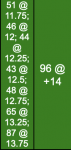

The above tells anyone looking at the SS that testing for PMPS began at +11.75 but the BG was too low; subsequent testing every 15 minutes occurred until the Caregiver felt the BG was safe enough to shoot at +14.

Additional testing might also occur during the cycle and should be recorded as shown below:
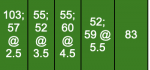
In the example above, the first test of 103 was taken at +2 followed by another test (57) at +2.5. Two tests were taken from +3 to +4 and are recorded in the +3 column. Two tests were taken from +4 to +5 and are recorded in the +4 column; two tests were taken from +5 to +6 and recorded in the +5 column. The last test was taken at +6 and recorded in that column.

It will be necessary to manually color in the cells when recording more than just a whole number in the cell. To do this:
  • record the data in the correct cell (e.g. 185 @ +3.25)
  • select the color from the ranges at the top of the SS which coincides for the test (e.g. 185 would be blue)
  • in the SS toolbar at the top, click on the icon which looks like a pitcher which should also show the text “fill color” when you move the arrow over it
  • next, in the SS toolbar at the top, click on the underscored A to the left of the pitcher; this should show the text “text color” when you move the arrow over it."

 
This sticky explains how to stack the numbers in a cell when you get more than 1 test in an hour:
https://www.felinediabetes.com/FDMB/threads/how-to-use-the-spreadsheet.241653/

"More Advanced Recording

Sometimes it is necessary to stall at PS if the BG is too low to shoot and tests are taken every 20-30 minutes apart and must be recorded. The BGs are then “stacked” as shown below and, in this case, recorded in the +11 column so the PMPS, which was at +14 can be recorded in the PMPS column:


The above tells anyone looking at the SS that testing for PMPS began at +11.75 but the BG was too low; subsequent testing every 15 minutes occurred until the Caregiver felt the BG was safe enough to shoot at +14.

Additional testing might also occur during the cycle and should be recorded as shown below:

In the example above, the first test of 103 was taken at +2 followed by another test (57) at +2.5. Two tests were taken from +3 to +4 and are recorded in the +3 column. Two tests were taken from +4 to +5 and are recorded in the +4 column; two tests were taken from +5 to +6 and recorded in the +5 column. The last test was taken at +6 and recorded in that column.

It will be necessary to manually color in the cells when recording more than just a whole number in the cell. To do this:
  • record the data in the correct cell (e.g. 185 @ +3.25)
  • select the color from the ranges at the top of the SS which coincides for the test (e.g. 185 would be blue)
  • in the SS toolbar at the top, click on the icon which looks like a pitcher which should also show the text “fill color” when you move the arrow over it
  • next, in the SS toolbar at the top, click on the underscored A to the left of the pitcher; this should show the text “text color” when you move the arrow over it."
Thanks for this info…tried again but the stacking still didn’t work on my iPad. I type in the additional numbers and press return…the entire entry disappears.
 
Back
Top